Mp3Doctor

Mp3Doctor

Mp3Gain Mp3 Normalizer BPM Mp3 Encoder

Mp3Doctor RSS Feed


mp3 geluids niveau mp3 geluidsniveau mp3 converteren

MP3 Doctor PRO is een editing tool waarmee je optimaliseren, testen, aanpassen en verbeteren van al uw MP3′s en Wavs op verschillende manieren. U kunt repareren onvolmaakte songs of te wijzigen met TRIM, vereffenen, resample, en met een zeer efficiënte en verbeterde procedure voor normalisatie MP3s – VOLUME normaliseringsinstelling en volume boost – functie. Het doel is u in staat om een vergelijkbare kwaliteit, volume en geluid in al uw MP3′s en ontdek een nieuwe kwaliteit in uw mp3-bestanden.

Door deze manier zul je niet alleen maar een consistent volume in uw verzameling MP3′s, maar u ontvangt ook een constante kwaliteit.

In de toekomst, bij het spelen van uw afspeellijst op uw mp3-speler, uw mp3-bestanden goed in overeenstemming met een passende omvang.

Er worden geen bestanden die klinkt ‘opaque’, ‘versleten’, ‘saai’ of ‘zwak’, en met een laag volume. Ook anderen die geluiden te sterk, schandalig of luid. Het afspelen wordt glad, met een goed volume, zo nodig om een onderscheid te maken en te genieten van elk nummer en voor elk deel.

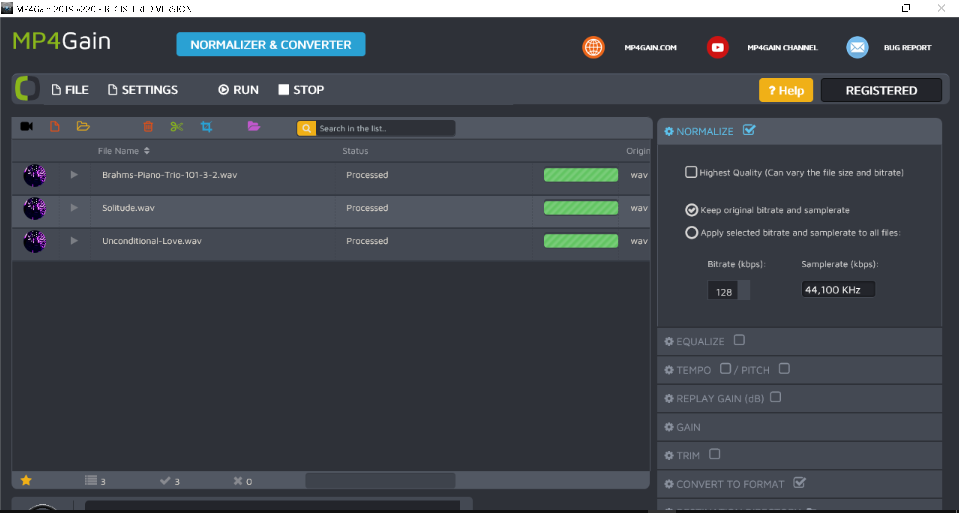
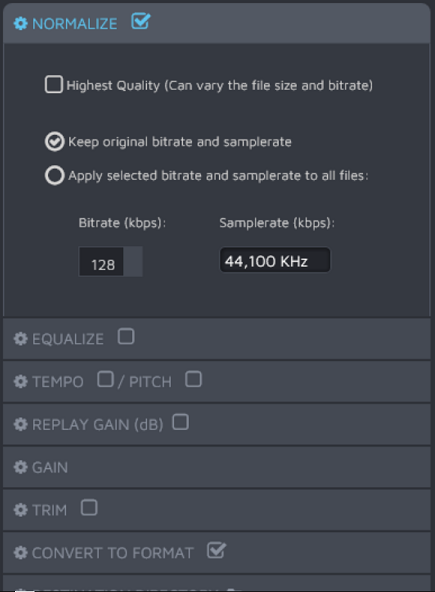
Normaliseren


Audio normaalgloeien is het proces van toenemende (of dalende) de amplitude van een audio-signaal, zodat het resultaat overeenkomt met een gewenste maximale amplitude. Gewoonlijk wordt de normalisering verhoogt de amplitude van de audio golfvorm met een maximum niveau dat geen enkele verdere verstoring. Zei in gewone woorden, normaalgloeien versterkt het volume (winst, volume) aan de maximaal mogelijke.

Het concept van dynamische normaalgloeien wordt gebruikt op dit moment, wat betekent dat het volume wordt vergroot in elk frame, door middel van ingewikkelde berekeningen, in plaats van het uitvoeren van een totale versterking van het audiobestand.

De dynamische normalisatie is de meest efficiënte methode te versterken, zodat een doeltreffende en wereldwijd, een audio-bestand (WAV, MP3, etc).

Het verschil tussen de dynamische normaalgloeien enerzijds en de oude methode bekend als mp3gain aan de andere kant, is in feite dat de toename van het volume plaatsvindt in elk frame van het archief, zelfs rekening houdend met verschillende geluidsdragers, zoals hoge frequenties, hoge en bas. Er is een totale winst, gebaseerd op een complexe berekening die alleen vullen de audio niveau dat nodig is om nadere uitwerking.


Waarom wil iedereen hard te normaliseren hun verzameling van mp3-bestanden?


Jaren geleden, mensen geluisterd naar hun vinyl lang speelt placidly vergadering in de woonkamer, omgeven door een vriendelijke stilte.
Zelfs de covers van de oude grammofoonplaten werden groter en bevatten veel informatie, songteksten en vele foto’s. Mensen kunnen comfortabel zitten, zonder enige haast om te luisteren naar elk LP (Long Play).

Het geluidsniveau laag was in die omgeving en de mensen kunnen horen elke noot en elk geluid detail opgenomen in de LP.

Maar vandaag, we horen onze favoriete muziek reizen in een trein, het rijden door een onderzeese tunnel, die in een park vol met andere sporters, enz.. De ruis is aanwezig om ons heen.

Ook moeten we beseffen dat we onze eisen voor kwaliteit en standaardisering van de omvang, wij zijn gewend om met spelers die een betere geluidskwaliteit. Vandaag hebben we een norm voor een kwaliteit die veel hoger is dan de norm die bestonden op het moment van dit geïdealiseerd scène die we al eerder zagen: een persoon zit rustig in huis, genieten van de muziek op een vinyl LP, terwijl u op de cover van de LP.

Om muziek af te spelen in de moderne hoogwaardige apparaten die momenteel bestaan, moeten we “tweaken” die oude opnamen van geluid, het versterken van de lage, midden en hoge tonen.

Momenteel is het niet genoeg om de nummer een, met een totale toename in volume. Onze hoge normen vereisen een moderne en efficiënte proces van normalisatie van het volume. Dus moeten we versterken en verwerken elk frame onafhankelijk. De verhoging van de lage frequenties waar nodig, bevestiging van de hoge noten soms verduidelijken en benadrukken de stem in een nummer … Kortom, we hebben een proces van normalisatie in overeenstemming met de hoge kwaliteit muziek afspelen apparaten die we gebruiken vandaag.

Evenmin mogen we niet vergeten de rumoerige omgeving waarin wij leven in onszelf.


Bass Boost


Mp3Doctor PRO kan versterking van de bas, verrijking van de ervaring van het luisteren ritme, Latin, jazz, salsa, rock en dance muziek, onder andere genres.

Misschien is het woord dat het best beschrijft dit proces is geoptimaliseerd normaliseren.

mp3 normalizer - mp3gain

Mp3Doctor PRO vergroot de ritmische en percussieve (drums) delen, verhoogt het volume krijgen in de bas, de middelste frequenties zijn geretoucheerd om de “aanwezigheid” van de stemmen en om de definitie van de instrumenten, zoals piano’s, gitaren, violen. Een van de opvallendste voordelen is dat je duidelijk kan waarnemen elk van deze muziekinstrumenten die zijn toegenomen en gedefinieerd; niet langer klinkende randen, vervormd of verward.
De hogere noten van het lied zal ‘glans op haar eigen’ na de normalisatie.

Wat zijn de methoden die we gebruikt voor de nadere uitwerking, gelijk en optimaliseren met verschillende niveaus van de verschillende instrumenten van elke song? Een zeer moderne normaalgloeien algoritme, dat zijn meestal gedaan beeld voor beeld (44100 per seconde gemiddelde).

Het resultaat zal zijn, zodat u niet nog meer te bewegen de volumeregelaar op uw mp3-speler met elke song afgespeeld.


Hoe moeilijk is het gebruik van Mp3Doctor PRO? De leercurve is hard?


U hoeft niet te worden van een audio-ingenieur voor het gebruik van de Mp3Doctor PRO. In feite is het heel eenvoudig te gebruiken. U hoeft alleen voor het laden van het mp3-bestand en druk op een knop, dat is het.


Moet ik een aantal specifieke kennis om inzicht te krijgen in de verschillende audio-instellingen van Mp3Doctor PRO?


Nee, nogmaals, alleen moeten kunnen druk op een knop. Dat is alles. Je drukt op een knop en de software draait automatisch, niets meer nodig. Misschien is de enige vereiste is dat u ontspannen en genieten van uw favoriete muziek.

Mp3Doctor PRO is de nieuwe hoogconjunctuur in termen van goed kwaliteit. Onmisbare metgezel als je het afspelen van digitale audio in draagbare apparaten zoals mp3-spelers, MP4-spelers, memory sticks, walkmans, draagbare mp3-speler in je auto, enz.. De software is ook geschikt en onmisbaar voor desktop computers en laptops.

Het zal je niet meer te voortdurend aanpassen van het volume schuifje bij het afspelen van MP3′s. U hoort instrumenten die nog niet eerder opgevallen.

Elke song zal in combinatie met het einde van het vorige nummer in een vlotte en perfecte manier.

Ook kunt u het tempo of de toonhoogte als je wilt een professionele DJ. Variaties in de hoeveelheid winst zal geen pijn.

Als een nummer begint met een zachte, lage volume, dit deel zal het volume adequaat zonder dat daardoor verstorend anderen delen die al een hogere of voldoende volume. Elk onderdeel van elke song zal heel hoorbaar, met de juiste volume.

Zonder de dynamiek van elk nummer, de omvang van elk deel wordt het meest geschikt voor een optimale reproductie

mp3 geluids niveau, mp3 geluidsniveau

Related posts:

  1. Mp3 Normalizer Mp3 Volume boost Mp3 Normalizer Everybody have felt sometimes that by playing our mp3 files, the volume levels do not match. Some songs have a higher volume than others. Therefore, when playing our mp3 files on the audio player, the result is unpleasant. We are forced to manually raise and lower the volume level. To remedy this, the best option is to use Mp3Doctor PRO. But less see how it works and why it does it better than other options. The old fashion method of normalizing (not used by Mp3Doctor) just seeks for the volume peaks of each mp3 file and then amplify all the volume with the same rate.  Per example, if the peak could be amplified by 3%, then all the file is amplified at the...
  2. Volume adjuster – user review Mp3Doctor PRO One comment received from our customers: You asked where I obtained the information on MP3Doctor.  I Google searched and went throught all of the information on your web site. I downloaded a test copy and it worked exactly as I wanted. The problem I had with the Google search was identifying a description of the program. Normalizer is one word I encountered. I had been using volume leveler and volume adjuster. I would suggest using several words that mean what the software does. One other thing.... I was impressed with the web site and the assurances that the software was legitimate and did not contain backdoors.   If you can afford it, I would recommend occasional brief radio advertising. (radio is cheap) because I think...
  3. Customer reviews and comments   1/22/2011       Folks,        I googled - Mp3 audio sound leveling software.  This particular software seems to work well for my purposes.  I will use to equalize mp3 files put onto my zune.  Will take guess work out of using Roxio equalizer.  Will require some deletion and re-entries, but will be worth the time!  Have a Great Day!     Fred (Bunkerman) I used Mp3gain a long time ago,  just got a new pc and lost the old program in the process.. Went onto the internet and found your product did a download tested it out, pleased with the results..   I recieved the info on your product from my brother. He said he loved it so I thought I would...
  4. Mp3 Encoder – Why we need to encode an audio file? Why we need to encode an audio file? To answer this question, it is necessary to first explain the meaning of the term mp3 encoder. An audio file of high quality take much space on your hard drive. Certainly, it has very good sound, but it's too big. These wav files occupy much space on your hard disk, thats why even devices with a large memory can't contain many audio files without encoding. Mp3 Encoder, which is the meaning of that term? According to wikipedia, encoder means: An encoder is a device, circuit, transducer, software program, algorithm or person that converts information from one format, or code to another, for the purposes of standardization, speed, secrecy, security, or saving space by shrinking size. Then in...
  5. Volume Boost – Volume Booster Volume Boost. Without any question, one of the hottest needs of the mp3 users are to find a way to Boost the Volume level of any mp3 file. The situation is very common and well known: When you listen to your mp3 files, you find that the volume levels are quite uneven.  Then you discover that you need to boost the volume level. ...After some time, and some pain (trying different solutions), you learn that its not only a matter of boost the volume level, but that you need to normalize it, optimize it. Then, finally you get into Mp3Doctor PRO and find that its exactly what you was looking for, because it standardize the volume level of all your mp3 collection, and at the...
  6. Mp3Doctor – Mp3Gain PRO – Audio editor Keywords searched from search engines: Keyphrases used on search engines 2910 different keyphrases Search Percent mp3 doctor 130 2.8 % mp3doctor 76 1.6 % volume booster 65 1.4 % mp3doctor pro 64 1.3 % mp3 volume booster 57 1.2 % mp3 normalizer 53 1.1 % increase volume of mp3 42 0.9 % mp3 booster 23 0.4 % mp3 sound booster 22 0.4 % mp3 doctor pro 22 0.4 % mp3 equalizer 21 0.4 % normalize mp3 21 0.4 % mp3 volume increaser 18 0.3 % bass booster software 17 0.3 % mp3gain 17 0.3 % normalizzare volume mp3 17 0.3 % software to increase volume 16 0.3 % volume increaser 15 0.3 % mp3 normalize 15 0.3 % sound increasing software 14 0.3 % mp3...
  7. Mp3Doctor PRO (audioeditor keywords) Aug 2011 Keyphrases used on search engines 10055 different keyphrases Search Percent mp3 doctor 630 3.1 % mp3doctor 325 1.6 % volume booster 270 1.3 % mp3doctor pro 264 1.3 % mp3 normalizer 264 1.3 % mp3 volume booster 210 1 % increase volume of mp3 134 0.6 % normalize mp3 127 0.6 % mp3 volume normalizer 98 0.4 % mp3 doctor pro 96 0.4 % mp3 sound booster 92 0.4 % mp3 volume increaser 91 0.4 % mp3 equalizer 90 0.4 % bass booster software 83 0.4 % volume increasing software 83 0.4 % mp3 booster 72 0.3 % normalizzare mp3 69 0.3 % volume increase software 61 0.3 % sound increasing software 58 0.2 % booster mp3 55 0.2 % normaliser mp3 55 0.2 %...
  8. Mp3Doctor PRO (3) More related searches: mp3doctor pro review mp3doctor pro keygen mp3doctor search mp3doctor software download serial mp3doctor pro mp3doctor pro key mp3doctor pro crack mp3doctor review mp3 normalizer freeware mp3 normalizer download mp3 normalizer software mp3 gain sound normalizer download sound normalizer software wav normalizer mp3 organizer mp3gain tutorial mp3 gain review mp3 gain mac use mp3 gain mp3 tag mp3 normalizer mp3 volume normalizer mp3 trim mp3 volume normalizer software mp3 normaliser mp3 volume normalizer windows mp3 cutter mp3 editor mp3 trimmer mp3 trim freeware mp3 splitter mp3 trim online mp3 trim mp3 trim free wav normalizer download sound normalizer software mp3 normalizer download wav normalizer software sound normalizer download sound normalizer mp3 normalization wav normalize mp3 normalizer ease mp3 wav converter sound normalizer software...
  9. Mp3Doctor keywords Keyphrases used on search engines 9365 different keyphrases Search Percent mp3 doctor 481 2.7 % mp3doctor pro 282 1.6 % mp3 normalizer 255 1.4 % volume booster 241 1.3 % mp3doctor 217 1.2 % mp3 volume booster 112 0.6 % normalize mp3 102 0.5 % sound booster software 92 0.5 % mp3 volume increaser 90 0.5 % increase volume of mp3 82 0.4 % mp3 equalizer 78 0.4 % normalizzare mp3 68 0.3 % mp3 sound booster 66 0.3 % mp3 volume normalizer 63 0.3 % increase mp3 volume 62 0.3 % increase volume 59 0.3 % mp3 doctor pro 57 0.3 % mp3 normalisieren 57 0.3 % mp3 booster 55 0.3 % musikfilformat 51 0.2 % mp3gain 50 0.2 % software to increase volume...
  10. Mp3Doctor PRO -audio editor (keywords) Sept 2011 Keyphrases used on search engines  to reach this website 10346 different keyphrases Search Percent mp3 doctor 584 2.8 % volume booster 316 1.5 % mp3doctor pro 308 1.5 % mp3doctor 275 1.3 % mp3 normalizer 266 1.3 % mp3 volume booster 211 1 % normalize mp3 120 0.5 % increase volume of mp3 107 0.5 % mp3 doctor pro 105 0.5 % bass booster software 99 0.4 % mp3 booster 93 0.4 % mp3 volume normalizer 90 0.4 % normaliser mp3 80 0.3 % mp3 volume increaser 76 0.3 % mp3 equalizer 74 0.3 % volume booster software 72 0.3 % volume increasing software 72 0.3 % software to increase volume 71 0.3 % mp3 gain 70 0.3 % increase volume 69 0.3 % mp3doctor...
  11. Mp3 Normalize, a perfect example of a good mp3 normalizing Mp3 Normalize, listen this example. Often in this blog we discuss about Mp3 Normalize methods and their theory. But its time to watch and listen some good examples of mp3 normalizing in action. This first video will be a perfect example on how the Mp3Doctor PRO mp3 normalize works. Because it does not only raise or amplify the volume level. It also boost the bass and "define" better other instruments. We choose some jazz file because its a nice and clean example of the possibilities of a good mp3 normalization (volume normalization, equalizing, etc) If you listen carefully (and maybe even if not) you will notice, in first place that the volume level was normalized and optimized, not only amplified. It was normalized at different values each...
  12. Mp3 Normalize, another example of mp3 normalizer Mp3 Normalize, a demonstration of a good mp3 normalizer. Lets continue with examples to let you notice the big difference that Mp3Doctor PRO can make when you normalize you mp3 files. Check this mp3 video: If you follow and listen to the mp3 video carefully, you will notice that its more than just a push on the volume level, it equalize it and boost the bass....
  13. Mp3Normalize – a perfect example of a good mp3 normalize Just watch the video and listen to it. Yes, it was normalized usign Mp3Doctor PRO (yes, it was normalized > mp4 normalizing). The original sound was low (as many mp3 and mp4 files) at least in some parts of the music. So we normalize it and made this cideo to show it to you. The benefit is so obvios, no need to comment anything else. ...
  14. Mp3 audio booster Questions: Is there a way to increase the volume of an mp3 file, other than turning the knob on the speaker or moving the slide up on the icon by the clock in the tray? I have tried converting the mp3 file to a wave file & opening it in Talk Works Editor & then increasing the volume there, but it was not really successful as the gain was very little. If I make an mp3 playlist of various files, when the mp3 player gets to some of the files, I have to increase the volume. What I want to do, is to increase the volume of the file somehow, (using a program, I suppose), so that when the particular file is reached in the...
  15. FLAC normalizer? Mmm... we are planning something about FLAC normalizer (laso wma normalizer, aac, normalizer, oog normalizer...) ... keep in touch. FLAC stands for Free Lossless Audio Codec. So lets start explaining what does it means: Free Lossless Audio Codec (FLAC) is an audio compression codec that employs a lossless data compression algorithm. A digital audio recording compressed by FLAC can be decompressed into an identical copy of the original audio data. Audio sources encoded to FLAC are typically reduced to 50–60% of their original size. FLAC is an open and royalty-free format with a free software implementation made available. FLAC has support for tagging, cover art, and fast seeking. Though FLAC playback support in portable audio devices and dedicated audio systems is limited compared to formats like...
  16. free mp3 converter Related keywords: youtube to mp3 converter free mp3 converter video to mp3 converter flv to mp3 converter wav to mp3 converter mp4 to mp3 converter mp3 converter download flac to mp3 converter m4a to mp3 converter rm to mp3 converter video to mp3 converter downloads youtube video to mp3 converter online video to mp3 converter video to mp3 converter free download flash video to mp3 converter video to mp3 converter online video to mp3 converter youtube video to mp3 converter for mac video to mp3 converter software video to mp3 converter website free mp4 to mp3 converter mp4 to mp3 converter download mp4 to mp3 converter freeware mp4 to mp3 converter for mac free mp4 to mp3 converter download mp4 to mp3 converter software mp4...
  17. Mp3 Normalizer keywords Keywords used by search engines: mp3 doctor    mp3doctor   mp3doctor pro    mp3 normalizer   mp3 volume booster   normalize mp3   mp3 doctor pro   mp3 equalizer   mp3 normalize   mp3 geluidsniveau mp3 geluids niveau mp3gain   volume increasing software   mpgain   mp3 volume normalizer   mp3 normalisieren   mp3 booster   mp3 doctor download   volume booster   volume normalizer   mp3 trim   volume increase software   mp3 volume increaser   mp3gain pro   mp3 volume increase software   mp3 gain   increase volume software   mp3 sound booster   normaliser mp3   increase volume   mp3doctor pro serial   youtube to mp3   normalize   mp3 volume   change pitch of mp3   mp3doctor pro keygen   http //www.mp3doctor.com/normalize.htm   batch normalize mp3   mp3 doctor pro serial   mp3 doctor free download   mp3 volume leveling   mp3gain pro serial   volume increaser software   booster mp3   equalizzare mp3   mp3doctorpro   mp3 volume equalizer   mp3 doctor pro crack   mp3...
  18. youtube to mp3 converter video to mp3   YouTube to Mp3 Converter Very soon we may release a new YouTube to mp3 converter.  ...
  19. Mp3Doctor PRO (iii) Keyphrases used on search engines 7684 different keyphrases Search Percent mp3 doctor 427 3 % volume booster 208 1.5 % mp3doctor 186 1.3 % mp3 normalizer 182 1.3 % mp3doctor pro 177 1.2 % mp3 volume booster 127 0.9 % increase volume of mp3 91 0.6 % normalize mp3 84 0.6 % mp3 doctor pro 69 0.4 % mp3 booster 61 0.4 % mp3 equalizer 57 0.4 % mp3gain 56 0.4 % mp3 sound booster 52 0.3 % mp3 volume increaser 50 0.3 % mp3 volume normalizer 50 0.3 % bass booster software 43 0.3 % mp3 pitch changer 42 0.3 % normalizzare mp3 41 0.2 % mp3 normalize 41 0.2 % volume increasing software 41 0.2 % software to increase volume 38 0.2 %...
  20. Mp3 Normalize example of non linear normalization Good mp3 normalize example, with non-linear normalization. Thats right. This mp4 video is a good example on how Mp3Doctor PRO does a non-linear normalization. In this case, we use non-linear as the mathematical approach, meaning "a system whose output is not proportional to its input". But lets go less technical and pay attention to the mp4 video (yes, we normalize the mp4 file using the alpha version of Mp3Doctor PRO, whic will be available very soon!). The important thing to notice is that lower parts raises more the volume level than higher parts of the original. Another thing to notice is that the bass and the guitar get pushed too (bass boost and guitar boost). Pay attention to the mp4 video: This next mp4 video,...
  21. Audio Normalize using Mp3Doctor PRO Audio Normalize, How to do it with Mp3Doctor PRO. As we state in other articles on this blog, one of the most usefull features on Mp3Doctor PRO is the hability to normalize audio levels. But its not only seeking for the volume peaks and then adjusting the overall volume level, as most audio normalizers do. Mp3Doctor PRO brings a new approach that is most effective: is adjust every single miliseccnd of the song. By this way, your song will have a very optimized volume balance. You will be able to perceive each instrument and passage of the music clearly. Audio Normalize comes to a new level using Mp3Doctor PRO. Also you will be able to pre equalize the mp3 file. At the end you will...
  22. Mp3Doctor.com The list of related keywords for this site on Jun, according to Google: mp3 trim mp3 doctor mp3gain mp3 normalizer volume booster normalize mp3 gain beats per minute mp3trim mp3 normalisieren mp3doctor extract audio from mp normalize mp3 normaliseren trim mp3 mp3 gain download mp3gain pro sound booster software volume boost mp3doctor pro mp3 volume don för utjämning gain mp3 bpm beats per minute mp3 normalize mp3 volume normalizer mp3 volume booster mp3 equalizer equalize extract mp3 from mp volume booster software what is an mp3 www.java.com download mp3 doctor pro mp3 volume increase mp3 booster normalization example tempo tempo beats per minute increase volume of mp3 lame mp3 koder normaliser mp3 pro software volume normalizer resample mp3 mp3 gainer normalization with example resample booster...
  23. Mp3 Trim (mp3trim) using Mp3Doctor PRO Mp3 Trim Mp3Doctor PRO offers the mp3 trim feature. What does the mp3 trim exactly does to your files? It cut the digital silence and / or any leading and ending silence (not only digital silence, but silence). Mp3Doctor PRO offers the possibility to trim your mp3 files with just one click. In fact it can be done at the same time of normalizing, equalizing, etc.   Just download the trial version of Mp3Doctor PRO and try it!...
  24. Mp3Doctor Review Mp3Doctor Review: Review:Doctor,Doctor, oh the term that is so heavily put on something that can "so to say" fix anything. When i go to the doctor's office i want my problem fixed. I don't want to pay and receive advice that doesn't work. This program, MP3 Doctor i feel is just like a real doctor. When i recently downloaded and used this program on my friends computer i found it very simple and easy to use. Overall for under $30 bucks i was able to edit, fix, remix, speed up, slow down, etc. Don't get me wrong! This program will do most of these things top notch but, you get what you pay for. Don't expect some record studio remix that's going to make it...
  25. Audio normalization Mp3 dynamic range compression Audio normalization is the process of uniformly increasing (or decreasing) the amplitude of an entire audio signal so that the resulting peak amplitude matches a desired target (the norm). Normalization is often used when remastering audio tapes for CD production, in order to maximize the signal level while not changing the signal to noise ratio. It is often combined with dynamic range compression and hard limiting to increase the apparent volume of a CD. It is typically applied along with other audio and digital processing, such as dithering. Dynamic range compression, also called DRC (often seen in DVD and car CD player settings) or simply compression, is a process that reduces the dynamic range of an audio signal, that is, narrows the difference between high...

Comments are closed.